Showing posts with label Tech. Show all posts

Thursday, November 06, 2014

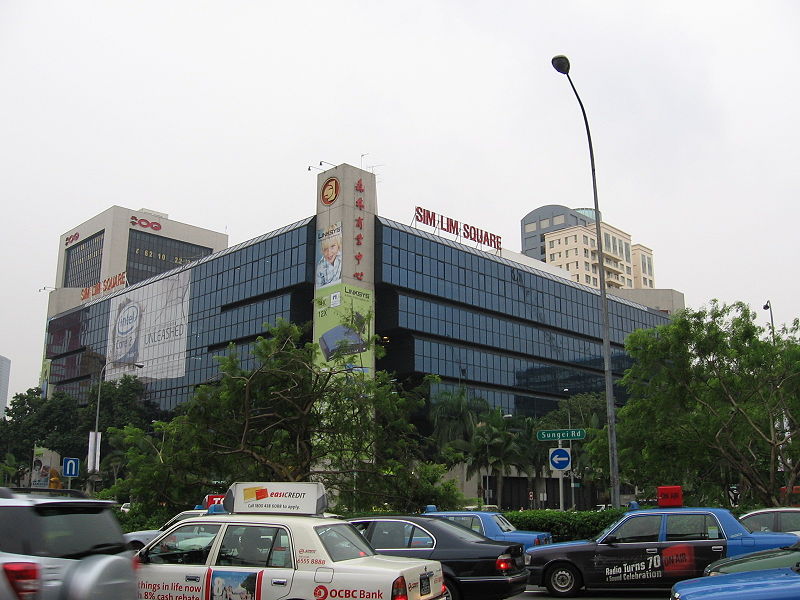
The Budget Geek's Guide to Sim Lim Square

As a techie, I am both a bit angry and sad at all the bad press Sim Lim Square (or SLS in short) is getting. Sure, SLS is notorious for scammers and inflated pricing, especially for the "more gullible" foreigners, but its really only a few shops that are being the black sheep among the rest of the (mostly) honest retailers that are doing honest businesses.


With all the big hoo-ha over Mobile Air and their treatment (or should I say... scamming?) of their customers, its understandable that the general public would want to keep away from SLS and do their electronics shopping at relatively safer places like Funan, Courts, Best Denki and so on.

But why stay away when there are bargains to be made?

If you are planning a trip to SLS but reconsidering due to the fear of getting scammed, here is a quick guide to surviving the place and walk out a happy customer!


Rule #1 - Research


SLS is an unforgiving place and can seem like a huge, confusing maze of shops, lights and Korean pop videos. To an unprepared and uninformed shopper it will be an absolute nightmare. So, do your research! 

Check out the shops which carry your desired purchase, do some background checks, scroll through the Hardwarezone and VR-Zone forums for advice and compare online with competing products. Always try to understand what the specifications mean and take the seller's "advice" with a pinch of salt. They are after your money after all :) 

Oh and most importantly - know what you want!


Rule #2 - Avoid the first 2 floors


I'm not saying that all the shops on #01 and #02 are bad, just a general guideline to adhere to when shopping. Its not a coincidence that all the shops on the CASE complaint blacklist are located on these 2 floors. Keep a lookout for salesmen who try to capture your attention, especially those who target Caucasians. "Hello sir, looking for cameras?" is a clear indication that you should steer clear.

What I normally do is head straight to the 5th floor and slowly work my way down to level 3. That said, not all the shops on level 3 and above are reputable - use common sense and remember Rule #1!

Rule #3 - Stick to a few familiar shops 


With less time to compare prices since I'm now a member of the working society, I nearly always head to the same shops every time I go back to SLS. Reputation and familiarity rank ahead of price for me. Good service is a plus!

The following is a list of shops I usually head to (in no particular order):
  1. Fuwell - for PC components and system building (friendly and knowledgeable staff)
  2. Bizgram Asia - PC components at competitive prices
  3. PC Dreams - for laptop repairs
  4. PC Themes - for PC components and system building
  5. SingInk - for 3rd party inks, printer modification and toners
  6. Tec-Drome - for the latest PC and console games, including limited editions and gaming gear (though with the popularity of platforms like Steam, business isn't doing too well. Feel kinda sad for the uncle)
Do note that I'm in no way endorsing the above shops, visit at your own risk (and remember Rule #1)

Rule #4 - Know what to buy in SLS


Maybe this is my own opinion, but SLS is really only worth a visit if you are:
  1. Looking to build your own custom PC
  2. Upgrading your PC
  3. Buying 3rd party inks/toners 
  4. Buying 2nd hand laptops
  5. Looking for connectors/cables/fans and other basic necessities
  6. Looking for cheap, China-brand phones/tablets/MP5 players (I LOL every time I see one)
  7. Looking for not-exactly-legal TV boxes, funky tech gadgets and cheap knockoffs
  8. Hungry for Northern Indian cuisine - the stall in the basement food court is awesome!
SLS is NOT worth a visit if you are:
  1. Buying a laptop/camera/monitor/router/printer/portable storage - wait for IT shows instead.
  2. Buying a brand-name smartphone/tablet. Seriously, if you want an off-contract iPhone with valid warranty, please get it from an official Apple reseller
With these 4 rules to follow, I believe the SLS experience should be a painless one! 

Monday, November 03, 2014

It's been awhile...

I was just looking through my list of posts and realised on top of that list was a draft titled "8 years, ありがとう、YUIさん" dated way back in January 2013.

I never wrote anything, just the title. I guess all the feels of YUI's "retirement" from music took over and I never got around to actually writing out that post. 

Who knew she'd surprise us all by forming FLOWER FLOWER? :D
But that's another story for another time.

As it turns out, I haven't written anything since then. If you noticed, my very last post (before this) was regarding the merits of custom ROMs on a HTC Desire S, which by today's standards, would be considered ancient technology.

Anyhow, while I'd love to do a tech-related post, such as rave about my current LG Nexus 5, or extol the virtues of my (sadly) stolen Sony Xperia Z, this blog has really become kind of a diary for my travels and a place to rave about my recent fanboy obsessions. Which, having attended my last concert of the year (probably!), is ultimately going to center on the amazing Japanese techno-pop trio that is Perfume.

But in the meantime, a little entry into the tech-diary for 2013-2014 (have I really been away that long?!) would be in order.

Mobile

  1. Upgrading from the aforementioned HTC Desire S to a Sony Xperia Z...
  2. ...and promptly had it stolen from me T.T
  3. Having just re-contracted, I ordered the LG Nexus 5 from Google 
  4. Running stock Android Kitkat 4.4.4, rooted with Xposed Framework and am happy with it for the moment (waiting for Lollipop!)

Networking

  1. Upgraded to Singtel Mio fibre from Starhub cable broadband (yay for 200mbps!)
  2. The ol' ASUS RT-N15U became a print server of sorts, replaced by the more-than-capable RT-N56U
  3. To boost speeds to my desktop PC in another room, I got a pair of Sineoji powerline adapters - cheap and work as advertised!
  4. Received a spare 2TB WD MyBook Live from an uncle and is currently running as a home server for music, videos and stuff. 

Computing

  1. My graphics card (an XFX GTS 250) finally died 
  2. Replaced it with an ASUS GTX 750 together with a Corsair CX500M power supply because I was afraid my old PSU couldn't handle the new card. Turns out it could -.-
  3. Sometime in late 2013, the first games that would only run on 64-bit OSes were released. Then in 2014 came the horrible, horrible news that I was dreading... FIFA 15 also required a 64-bit OS (I was running 32-bit Vista - I know, laugh all you want)
  4. And with a heavy heart, I upgraded to 64-bit Windows 7, together with a new hard disk because why not?
  5. To date I'm counting down the days I have left before I need to change my motherboard, processor and RAM in order to play the latest games. Already, Assassin's Creed Unity is out of my reach T.T

... Well, that felt good, reminiscing about all that techie stuff.

Next post will be about my recent 5 day solo trip to Japan to catch Perfume's 5th Tour "Gurun Gurun" in Tokyo, followed by their World Tour 3rd Live in Singapore :D

Thursday, January 10, 2013

Android and me

Well, it comes as a surprise to me that I haven't really done a post about my (1 year, 4 months and counting) experience with my Android-powered HTC Desire S smartphone and the Google Android ecosystem. It's been a long while since I posted anything geek-related so this shall be a little biography of sorts, to commemorate 1 year and 4 months of Android and me. 

(A mostly subjective post on Android - if you're a fellow 'droid, someone considering taking the plunge, or just an Apple user interested in "the other side", read on)


The Beginning


It all started back in August 2011, during a time when the smartphone revolution was in full swing. Apple's iPhone was THE phone to get, while I was still tottering away on my 2 year old Nokia E63 (physical buttons ftw!). It was about time for a re-contract, and as almost everyone does nowadays, a re-contract equates to a new phone. I knew long ago that the iPhone 4 and the Blackberries weren't for me, mainly due to the nature of their highly restrictive ecosystems. I was impressed by the user-interface of Windows' mobile OS, but baulked at the lack of apps, so I settled on Android.

The Phone

At the time, the two major Android phones in contention were the newly released Samsung Galaxy S2 and the HTC Sensation. Both were equally matched in terms of features and specifications, but I didn't like the S2's plasticky look and preferred the nice, hefty feel of the metal-encased Sensation. Of course, being the budget geek that I am, price was the deciding factor - both were going for around $300-$400 for my preferred plan, which was way above my $200 budget.


I settled on the next best alternative - the Sensation's little brother, the HTC Desire S, which was on promotion. At that time I thought, "Why the heck would I need a dual-core processor? A single core would do fine! And besides, battery life would be so much better!". Little did I know that in just one year's time, quad-cores would be the industry standard (lol). On the bright side, I ended up paying only $48 after trading in my old Nokia.


The HTC Desire S
I won't do a review of the DS here simply because many sites have done it, and the fact that it is a very, very outdated phone by current standards. I still love it to bits though, for its compact 3.7" screen, aluminium body, the subtle "lip" at the bottom, and the fact that it still remains relevant in today's iPhone 5, S3, Note 2 and One X dominated world.

The Early (and dark) Days

It was a little hard getting used to a touchscreen after a decade of using physical buttons. Still, thanks to the matte screen protector that I slapped on it (I hated the squeaky smoothness of clear ones), I was soon swiping my way with ease. Unfortunately, HTC's Sense 2.0 user interface wasn't as user friendly and smooth as I expected.


One of the first obstacles I faced was migrating my contacts from the SIM memory into the phone. Somewhere along the migration process I screwed something up and promptly (and accidentally) deleted every contact I had. I had to rebuild my contact list the hard way, but thankfully I had an existing Gmail account which helped tremendously.

Next was the frustratingly lag-infested crap that HTC called Sense. Mind you, the current Sense 4.0 coupled with Android's Ice-Cream Sandwich/Jelly Bean has come a long way since those dark days of Sense 2.0 (and even 3.0). Visually, Sense was beautiful - widgets were well designed, menus were attractive, even the icons matched the whole theme well. Unfortunately, the poor single core processor couldn't handle all the visual goodies, which also negatively impacted battery life tremendously.

The iconic HTC Sense clock widget
I also had a minor scare when the phone refused to boot up and got stuck at the HTC logo, despite repeated attempts of removing the battery and rebooting (which I later learnt was actually a very dangerous thing to do). The problem solved itself after a few hours though, thankfully.

Delving into the world of root and custom ROMs

Things started looking up after I made the decision to go turbo (if you've watched the movie Wreck-it-Ralph, going turbo refers to going rogue lol). Thanks to the amazing community at XDA Developers, I found easy to understand instructions for rooting the Desire S, along with loads and loads of custom ROMs undergoing development. The forums contained many newbie-friendly guides for just about everything Android-related, including the seemingly crazy world of ROM flashing.

XDA Developers
Just in case you're the owner of an Android phone, and like me have decided to go turbo too, just a quick reminder that rooting your phone voids the warranty, so only do it if you're absolutely sure (well, there are ways to reverse the root process, but I won't talk about that here).

And so with the help of XDA and YouTube, I rooted my Desire S and promptly installed my first custom ROM - Saga LBC mod. I'm not sure what made me choose that, but I believe I was watching a tutorial for flashing a ROM on the DS and it just so happened the guy used that as a demo. Of course, I was still a total n00b at custom ROMs back then, so I didn't really know what to look out for when choosing one.

Saga LBC Mod, based on Sense
One of the first things that I did, having rooted my phone and installed a custom ROM which supported it, was to overclock the processor. The euphoria of having overclocked the stock 1 GHz processor to 1.5 GHz  lasted just 4 hours (lol), having drained 50% of the battery. Other stuff I did was to install awesome apps like Tasker and Titanium backup, which needed root (I'll elaborate more on the apps in a separate post).

Even with the added functionalities that came with root and the custom ROM, I still wasn't satisfied with the performance without compromising on battery life. And then I discovered CyanogenMod, or CM in short.

CyanogenMod

If you've ever done a search on custom ROMs, inadvertently you'd have come across CM, considered one of the most (if not THE most) popular custom ROM for Android.

CM7 on the Desire S
In a nutshell,
CyanogenMod is an aftermarket firmware for a number of cell phones based on the open-source Android operating system. It offers features not found in the official Android based firmwares of vendors of these cell phones. - http://www.cyanogenmod.org/
In other words, CM is stock Google Android, with added awesomeness! One of the first things I noticed after flashing CM7 (Gingerbread) was the whole cyan theme embedded into every nook and cranny of the phone, which felt so natural as if Android was made to be blue - I loved it! (And Google too, for they also incorporated a bluish-cyanish theme for Honeycomb, Ice Cream Sandwich and Jelly Bean).

The second thing I noticed was the added smoothness CM actually gave my lag-plagued phone, which was no longer a pain to use. Part of the reason for this was the fact that CM based itself upon the stock Android operating system which was lean and optimized for use the way Google intended it, unlike the lumbering beast called Sense.

One of the additional features in CM that I found indispensable was the ability to tweak the settings for auto-brightness - I could adjust brightness levels for specific ambient lighting conditions - which did wonders for my battery life (screen brightness is usually the number one culprit of battery drain). Other not-so-functional-but-still-awesome features included customizable lockscreens, embedded power toggles in the pull-down notification menu and (in CM9 and later versions) sweep2wake!

Sweep2wake basically enables you to turn on/off the screen just by swiping across the four physical buttons at the bottom of the phone (the home, menu, back and search buttons). Sweep left to lock, sweep right to wake (hence sweep2wake), no more pushing of the power button! This function very nearly became a lifesaver when I dropped my phone a few months back, denting the power button and causing it to cease functioning. Thankfully it popped back out after a few hours (my phone seems to have mysterious regenerative powers lol).

Breaking the upgrade cycle

Cid, the (new) mascot for CM
And so here I am now, in 2013, holding onto my HTC Desire S flashed with Andromadus CM 10.1 running Jelly Bean 4.2, when many of the S3s, Note 2s, One Xs and whatnot out there are still stuck on ICS or even Gingerbread (gloating time lol).

And herein lies the reason for flashing a custom ROM, especially if you're not using a Galaxy Nexus or Nexus 4 - you won't get upgrades until your phone manufacturers say so, which is often several months after the official Google release. Nexus users don't have this problem as they get upgrades the instant Google announces them (lucky them!)

And if you're using an outdated phone, destined to be relegated to the scrapheap? Tough luck trying to get an official release.

One of the things I love about Android is the dedicated developer community that keeps 2 year old phones like the Desire S viable in today's quad-core, 5 inch screen world. After trying CM7 for a couple of months, I got the itch again when Alpha builds of CM9 were released, promising an upgrade to ICS. Then came CM10 which brought Jelly Bean and Project Butter to the Desire S, followed most recently by CM10.1 with JB 4.2. Amazingly, CM9, 10 and 10.1 weren't even official releases, just test builds by a handful of extremely dedicated developers (shoutout to Nexx, nk111 and Flinny from XDA, you guys are awesome!). Sure, I'd get a couple of random reboots in a day, but that's a small price to pay for having the latest Android OS on an ageing phone :D

------------------------------------------------------------------------------------------------------------

Prologue

How long will I keep this up, I always wonder to myself. Will I upgrade my phone to a Nexus 4 if/when it becomes available locally? Will I be tempted to get a new phone when my line is up for recontract in August? Will I stick with the Desire S until it finally dies?

Sorry A-chan and Kashiyuka >.<
In the meantime, I'll be happily munching on jelly beans until the time comes to make a decision ;)

Sunday, June 10, 2012

ASUS RT-N15U "Black Diamond" Router

*UPDATE*
I've just flashed the custom firmware Tomato USB for this router and its been working fine. Best of all, I get the ability to overclock the Broadcom chip and boost the transmit power for increased range. QoS takes a little to get used to though (not as idiot proof as the original ASUS firmware).

This is a good blog detailing the steps required to flash one yourself: http://moonlightknighthk.wordpress.com/2012/02/04/install-tomato-firmware-on-asus-router/

=====================================================================

June is always the period of time when I start to feel the urge of getting some new gadget to fool around with. Why June? Well for one its usually the school holiday period, meaning I suddenly have lots of time to think about buying new toys, and secondly there's also the PC Show. Most of the time I resist the urge (haven't bought anything major since 3 years ago, when I upgraded my desktop), although there was an exception earlier this year when I bought my second-hand Toshiba laptop.

So anyway, every tech purchase has to have a reason behind it (my personal motto). I don't go around "hooting" stuff because its a blazing new technology, because everyone has one, or because its cheap/on offer. For one, I don't have the moolah to be able to do that (the reason why I call this blog "thebudgetgeek"). And of course, the most important thing - if you have a good reason to buy something, you'll make the most out of it (and reduce unnecessary wastage of money and resources).

The reason this time? My sis was complaining that the Wi-Fi signal kept getting dropped, and I had instances where my connection was dropped during Starcraft 2 games (rageeee!!). The problem could very well be on Starhub's side, but I then realised that the number of connected devices at home was mind-boggling -  desktop, 4 laptops (usually only 2 being used at a time), 3 iPhones, 1 Desire S (mine), and 1 iPad 2.

Its amazing how we survived on our old Linksys WRT54G. To be fair, it was working fine throughout, but I wanted to get a Wireless N router to cater to all those devices with N capability (all except 2 older laptops), and to prepare for a future fibre broadband network.

So I headed down to the PC Show on Thursday with a single target in mind - the ASUS RT-N15U "Black Diamond" router. There were other candidates from D-Link and Linksys with similar specs, but I chose the ASUS in the end for its lower price point. The main draw this time was of course, Wireless N, and the ability to connect a USB device direct to the router for sharing (printer, hard drive etc.)


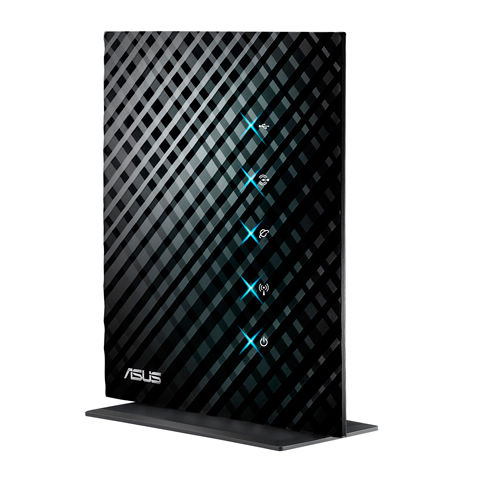
The beautiful design on the router face
Features

Wall-mounting
Wireless N networking up to 300mbps, supports older standards
4 Gigabit LAN ports, 1 WAN port, 1 USB port
Printer sharing
FTP file sharing
UPnP media streaming
QoS, Firewall
Multiple SSID
3 networking modes - Router, Repeater and Access Point modes

Setting up

I must praise ASUS for this - the router was a cinch to setup. Normally the thought of setting up a secured wireless network would give me the shudders, but the RT-N15U surprised me. No installation CDs, no step-by-step procedures to follow - plug in the cables, open up a browser, fill up the SSID and Network Key, and you're ready to go!

Advanced settings can be tweaked using the webpage UI and is really quite foolproof (although the UI felt a little kiddish). I managed to setup MAC address filtering and QoS (quality of service) in a few clicks.

On the other hand, printer setup took a little more effort. I couldn't connect to the printer for a good 1 hour, despite running the printer setup utility and reinstalling the printer drivers. Eventually I gave up, left the house, and when I came back 2 hours later, it magically worked. /shrugs

Performance

Arguably the most important factor that everyone looks at. I wanted to take full advantage of the wireless N network adaptors in my Toshiba Portege and my sis's Sony Vaio. The smartphones and iPads all come with this standard so they'd benefit from the potential increase in speeds.

I was disappointed though. Firstly, I had to run my router on "Auto" mode instead of "N only", which means it could support wireless G devices (the 2 ageing laptops). This would cut down any potential speed improvements if both N and G devices were operating at the same time.

And secondly, even without the 2 old laptops connected, the wireless speeds weren't THAT impressive.

My desktop (Gigabit LAN) speedtest results:


Desktop YouTube test results (10:29 1080p HD video):

10 minutes of cheerful Irish music

My laptop (Wireless N, in my room 2 walls away) speedtest results:


Laptop YouTube test results:


Upload speeds were consistently low (Starhub -.-), but the download speed dropped drastically on Wi-Fi. Of course, these were just numbers, so to simulate a real-time test I loaded a 1080p YouTube video and waited for it to load (the grey bar). Surprisingly, not much of a difference! Of course, this could be due to the QoS settings of the router which prioritised online video streaming, which in this case proved extremely useful.

Looks

Not an important factor when it comes to routers, but this is one seriously sexy looking router.  It helps if the router is located on top my desktop PC with the exact same colour scheme - black with blue LEDs. Linksys first made the router sleek with its E series, but ASUS does it in a way that appeals to the inner tech "beng". If my earlier photo didn't do it justice, here's the official picture:

Sexy black with blue LEDs
Overall

In terms of functionality and value for money, this router is definitely the top choice among the budget-conscious. Almost all modern routers are now wireless N capable, so that isn't much of a deal-breaker; the ability to connect a printer or a hard disk for sharing/streaming certainly is. Linksys routers have the brand name behind them, and I don't doubt their quality, but that comes with a premium ($$$). I was torn between   this and a similarly priced D-link, but who could resist the looks of this "Dark Knight"?

Slightly disappointed with the speedtest results, but at least I'll be able to print wirelessly now :)
Hopefully with the arrival of fibre broadband over the horizon, the full potential of this router will be realised.

Would I recommend it?

If you're living with ancient Wi-Fi technology and thinking of an upgrade, this would definitely be a viable option - just don't expect too much in terms of performance.

Wednesday, April 11, 2012

When Hard Drives fail...

And so I've gotten meself a "new" laptop to replace the ageing (or rather, aged) Compaq V3000 notebook I received from Starhub for signing up with their broadband plan 5 years ago. There wasn't any particular reason why I needed a replacement, and indeed I would have continued using the Compaq if its CMOS battery didn't start conking out on me. Sure I could simply swop out the battery, but couple that with the fact that PUB, the place where I'm currently interning at, loaned me a spanking new HP Elitebook 2560p to play around with, it was inevitable that NAS hit me. (If you know what GAS means, you'll know what NAS refers to.) *GAS refers to Gear Acquisition Syndrome

My old Compaq (with the Apple logo)
 and the new Toshiba 
I bought a second hand Toshiba Portege R830 for about half the stated retail price from a vendor in Sim Lim Square with about 8 months of warranty left. I won't say its second hand really, since its never been turned on, but I wouldn't call it sparkling new either. It came free with the M1 fibre promotion which probably contributed to the bargain price. 

Either way, I've had my eye on the R830 for a long time after doing copious amounts of research - 9 hour-long battery life, 13" matte screen, Intel Core i5, 6GB RAM, DVD player, HDMI, VGA and Ethernet ports, USB 3.0, SD card slot - how did Toshiba manage to squeeze all that into a slim frame weighing only 1.4kg? The R830 was released before the era of the ultraboook (2011), yet I'm sure this business grade laptop will slot in with the new crowd perfectly fine. The only fault I could find was the average integrated graphics card and the whiny cooling fan. Check out the Cnet Review.

The Portege R830 (left) vs the Elitebook 2560p(right)
Anyway, I wasn't surprised or worried when the new notebook started giving me problems - random blue screens, slowdowns and crashes - since it was still under warranty. While I couldn't tell what was wrong from the blue screen error codes (yes, even Google failed me), the sounds coming from the hard disk though hinted to me what it was - a dying hard disk drive.

First thing I did was to run Check Disk and it passed the test. I wasn't entirely convinced though, and another blue screen spurred me to try SeaTools. My suspicions were confirmed when it failed the long test. Just for good measure, I downloaded the bootable Hitachi Drive Fitness Test which also confirmed that the hard disk was bad.

Luckily for me, the laptop was still usable so I immediately did a backup before bringing it down to the Toshiba Service Centre in Kallang. After only 2 days of waiting (not counting the weekend), I got back my notebook with a brand new hard disk installed! After all those horror stories of people's experiences with warranty claims and the RMA process, I was pleasantly surprised that Toshiba did everything efficiently and did not give me any problems at all.

I just hope this new hard disk works fine: My sister's Sony Vaio laptop had to be sent back twice for the same problem when it was still new.

I didn't intend to do a review on my new purchase, but what the heck:

Toshiba Portege R830

PROS:
- Slim and incredibly light
- Full featured business notebook (not nerfed with ultra-low voltage chips)
- Tons of connectivity options
- Soild build-quality
- Robust battery life

CONS:
- Expensive, compared to newer ultrabooks in the market
- Mediocre graphics
- Noisy fan when things get hot
- Tiny speakers, bad sound

Clearly not a laptop for entertainment junkies or gamers, but its a winner when it comes to portability and battery life. Few laptops out there can match its lack of weight other than the lightest of ultrabooks (and its newer cousin, the Z830). It won't handle high-end games but it certainly runs Starcraft 2 fine at the lowest possible setting. HD videos run smoothly as well, though external speakers/headphones are a must for videos and music.

---------------------------------------------------------------------------------------------------------

Have you had any horror stories when doing a warranty claim? Looking back, I guess the reason why I was expecting the worst was probably due to people's tendency to rant and complain if they've had a bad experience - few would do the opposite for a good experience.

How about a pleasant experience?

Monday, February 13, 2012

The Kindle Revolution

And so I decided to delve into the realm of the Amazon Kindle.

Actually, it was something totally unexpected. I never thought that I would join the growing ranks of ebook readers, considering the fact that I've been reading lesser and had hardly picked up a book last year. I've even stopped following mangas, mainly because the Full Metal Alchemist series had ended, and Chuangyi had stopped publication of the Negima series (for whatever reason, I don't know). The last book I read was probably the final Harry Potter book for a quick refresh before catching part 2 of the Deathly Hallows movie.

I never considered picking up a book to read, mainly because there were so many other alternative (and arguably more alluring) entertainment options out there (games, movies, dramas etc.). The rigors of undergraduate life also meant that the only reading I could get done were lecture notes and newspapers. Even the monthly National Geographic magazine which I've always looked forward too suffered some form of neglect. I did enjoy the occasional tome now and then though, mainly pinched from my sis' library (Kite Runner, A Thousand Splendid Suns).


VS

Guess who won?


Why the sudden return to reading?

Well, it was nearing the end of December 2011, that time of the year when one starts worrying about gifts and stuff like that. I was racking my brains for a practical, meaningful gift that didn't end up in the sewers or the rubbish chute for my girlfriend. Since she'd been complaining of doing nothing but watching dramas and movies on her laptop the whole holiday (and contributing to eye fatigue), I figured a book would make a nice gift.

This led to that, and I thought to myself, why get one single book, when you can get an ebook reader that can read (and store) thousands of ebooks for a fraction of the price?

The Kindle Touch 
And so I got myself a couple of Kindle Touches, for only USD$99 each from Amazon.com, excluding shipping of course. Amazon doesn't ship the Kindle to our sunny shores of Singapore (I wonder why, considering there's a huge demand for them over here), so I had to go the long way by using Vpost.

Thankfully both Kindles arrived safely here within a couple of weeks. Needless to say, she was absolutely enthralled by this thin, little 6 inch device. I loaded in a couple of Nicholas Sparks' novels and she was glued to it for nights on end.

What is it about Nicholas Sparks that draws ladies like sugar to ants?

That aside, I've been using it for almost a month now and I can safely say that I'm ready to give up reading physical books (yes, I'm one of those people that are contributing to the downfall of Borders, PageOne and other bookshops). Its just so simple to use and pleasing on the eye - if you've ever tried to read an e-book on your computer screen or even an iPad/tablet, you'd be rubbing your eyes after a couple of hours. Not so with an e-ink reader like the Kindle Touch.


The text rendered by the e-ink screen is absolutely gorgeous. Nothing else can match it when it comes to rendering pure, black text. I've used it for a few hours at a stretch and the only strain I get is a backache from sitting too long. Tapping the screen flips the page in an instant (after a software update 5.0.3), while long pressing a word brings up dictionary definitions. Highlighting and annotations are also possible, if you're into that sort of thing. Font and font sizes are customisable as well.

All's nice and rosy for the Kindle Touch right? Not so, especially when it comes to actually buying e-books to read with the Kindle Touch.

To cut the long story short - Amazon doesn't accept Singapore-issued credit cards when buying e-books from their online store. And this is the part that turns most people off - I almost gave up the idea of ordering the Touch thanks to this. There is a workaround, thankfully, as described by this blog, which gives a rather comprehensive guide to getting a Kindle and e-books here:

http://jeffyen.blogspot.com/2011/11/amazon-kindle-touch-in-singapore.html

The steps are tedious and complicated at first, but once you get used to the idea (of using gift cards), it'll become second nature to order e-books from Amazon.

But wait! There's more!

After even more research I realised that you can actually buy books from other online stores and convert it to a format supported by the Kindle (MOBI format). The software to do this is Calibre, a free software which acts like a e-book library organiser as well as a converter.

http://calibre-ebook.com/

In other words, you don't have to be chained to a single e-book retailer like Amazon (which is actually what they want, to earn even more, just like printers and ink). You can borrow e-books from our local libraries (NLB), or buy from Skoob, a local  e-book online store launched by Singtel. Prices are competitive and I must say cheaper than those offered by Amazon (due to the exchange rate). Note that the e-books sold by Skoob can't be read by the Kindle directly due to DRM, however this restriction can be removed (which I shall not mention here).

So, if you're considering getting an e-ink e-book reader, you might want to consider the Kindle Touch!

PROS:
- Affordable price (USD$99)
- Attractive, slim form factor
- E-ink display is excellent
- Interface is simple to use and master
- Page turning and refreshes are fast (after software update)
- Month-long battery life

CONS:
- Cannot read under low-light conditions (all e-ink readers suffer this)
- 3G and Whispernet (which syncs your books and bookmarks online) only works in the US.
- Difficulty in getting e-books from Amazon
- $99 version comes with ads, which are actually quite tastefully done IMO

If you're not a fan of touchscreen interfaces (which shouldn't be really, considering everything is going all touchy), you might want to consider the cheaper Kindle 4 (USD$79) that uses good ol' buttons for navigation.

--------------------------------------------------------------------------------------------------------

In true Budget Geek fashion, if you're looking to save some moolah on books over the long term, I'd recommend getting an e-book reader. E-book prices are typically 20-30% cheaper than their physical cousins, and older ones can cost up to 50-70% cheaper. Free e-books can be found in abundance as well, not just from the libraries (even in the Amazon store), so you'll definitely save in the long run.

And lastly, if you, like me, have been neglecting your books in favour of the LCD/LED backlit screens of your computer, you'll rediscover your love for reading with an e-book reader.

*My parents asked me a question when I told them I bought the Kindles: "Why not get an iPad? You can watch videos, play games, do so many things!"
I replied: "Because all I wanna do is to start reading again." /likeaboss
Thursday, January 19, 2012

Spring Cleaning

It will be the Lunar New Year in a couple of days' time, and, contrary to what a certain smartass has been spouting all over the Internet, Chinese New Year isn't a copy of the Western New Year. It's like saying bak chor mee (minced meat noodles) is a copy of linguine bolognese done aglio olio style.

They're not the same, ok? For one, bak chor mee uses minced pork, bolognese sauce uses minced beef. It's like saying pig copy cow! (ok, we're running away from the topic here)


Anyway!

A tradition in many Chinese households is to conduct a "spring cleaning" of the entire house - that is to say, throwing out old junk that has been accumulating dust and ススワタリ (soot sprites, from My Neighbor Totoro) over the past year.

susuwatari (soot sprite). isn't he adorable?
 Aside from just your physical belongings though, one thing many people overlook is the amount of junk that can accumulate inside your PC/laptop. And I'm not just referring to physical dust, I'm referring to junk inside the little rectangular block of metal that is called a hard disk drive. If you're wondering why your PC/laptop is slowing down, you can thank those junk for it. And yourself, for not doing regular maintenance :p

So here I will give a little guide on how to Spring Clean your HDD, for all the non-geeks and computer idiots out there (Windows only, sorry). Note: You might want to leave plenty of time to complete all these.


Level: Noobcake 

First, do the easiest (and most tedious) part. Go through your files and delete whatever you think you don't need - old pictures, videos, Word documents, Powerpoint presentations, whatnot. Uninstall old programs and games that you've finished playing. Mind you, confine your rummaging to files and programs that you recognize and know, don't go around deleting files from Program Files or Windows/system32 or something horrendous like that.

Oh and do remember to empty your recycle bin after everything.

Run a virus scan. If your antivirus is out of date, or the subscription ran out, or basically is named Norton or McAfee, get a free one like Microsoft Security Essentials (Free download). Make sure to update it before running.


Level: Not bad

Tools required: CCleaner (Free Download)

 Now on to the more serious stuff. You do know that temporary files accumulate after every Internet browsing session right? And that they are the main reason behind the slowing down of your computer? Right? .....right?

After downloading and installing CCleaner, run it. Chances are, it will have removed a few hundred MB worth of temp files. Do note that doing so will delete any cookies as well, which means that your highly convenient "keep me signed in" for Facebook and email and other login sites will be gone. Don't worry though, we'll sort it out later.

Click the next tab "Registry". Do a scan, and click "Fix selected issues". CCleaner will prompt you to make a backup of your registry items. Click Yes, save it somewhere accessible, and carry on with the fixing.

Next head on to "Tools". You will notice an Uninstall manager similar to the one found in the Control Panel. Select the "Startup" tab. This will show you a list of programs that will run the first thing when Windows loads. Disable those programs you don't need at startup. As with the earlier rule, only disable programs that you recognise. Don't worry if something breaks the next time you start your computer, you can easily re-enable it here.

Click "System Restore". Remove all entries EXCEPT the most recent one (and maybe the 2nd most recent one). Chances are, if your computer was working perfectly fine on those dates, you won't have any problems. Restore points are some of the largest space-wasting files you can find, so don't be surprised to find that your HDD free space has increased. Ignore the last option "Drive Wiper".

Now head on to "Options" -> Cookies. Put the sites that you frequently access (and need that auto-sign in) on the right under "cookies to keep". That's it! The next time you go to Facebook, you might need sign in again, but subsequently you won't have to.


Level: F-yeah

Tools required: Time. Lots of it.

Now that your hard disk is all clean and Edward-sparkly, its time to re-organise all that's left to fill up those holes that have been left by your furious deleting. Yes its that phrase we all love to hate - its time to defragment your hard disk!

Go to Control Panel -> System and Maintenance -> Administrative Tools -> Defragment your hard drive. Start the task. And wait. And wait some more. You might want to do something else while waiting.

Now for the final step - Do a backup of the entire system. Now this is entirely up to you, as I'm not entirely sure what's the normal backup routine for you guys. How often do you do a backup? Post in the comments if you can :)

One thing's for sure, backups can be very, very useful. They can save you from lots of hassle in the event of a (touch wood!) system crash or a lightning strike. In my case, I try to do a system backup once every 6 months. For important files and other documents I try to backup whenever I make changes to them.

For all of us Windows users, there's always the built-in System Restore. Control Panel -> System and Maintenance -> Backup and Restore Centre. Choose "Create a Restore Point", and you're done!

Unfortunately restore points don't always work (I've experienced it myself), so the best would be to make a full system backup. You can get some suggestions for software that will do the job here: Best Free Backup Program 

Different people have different backup options. I personally use a 3rd party program and save my backups in a separate external HDD that I protect from the elements. Some prefer to burn to CDs and DVDs, but its difficult to keep track of them.


And that's it! Spring Cleaning isn't that hard, eh?


------------------------------------------------------------------------------------------------

To keep your computer running smoothly I'd recommend running CCleaner once every few days to prevent those temp files from accumulating. I run it every time before I shutdown my PC as a habit.


Enjoy the Lunar New Year holidays everyone! 新年快乐!

Wednesday, February 23, 2011

First geek post of 2011

Since I'm at home on a school day (just went to the doc and he said I'm finally free from crutches!), I decided to write a long-overdue post. And a geeky one at that.

and here it is - the updated list of free, useful apps that currently reside on my machines.

1) Microsoft Security Essentials http://www.microsoft.com/security_essentials/


I abandoned AVG Internet Security for this, mainly because AVG 2o11 refused to co-exist with my COMODO firewall, something I couldn't sacrifice for the sake of an updated AVG version. So I went searching for an alternative, and MSE popped up with very good reviews. One review in particular caused me to go ahead with MSE "...these guys at MSE are working to protect their own product (Windows)..."

Made sense to me. Low on resources, unobtrusive, regular updates, scanning is fast, and according to many websites has a fairly good detection rate. And its free!

2) COMODO Firewall (and Anti-virus) http://personalfirewall.comodo.com/


I've been using this for many years now, and it hasn't disappointed me yet. It usually detects malicious stuff way before my anti-virus could even sniff at it, which says a lot about its monitoring ability. Excellent replacement for the Windows Firewall.

It has a setting called Defense+ that prevents unauthorised installations, but isn't for the faint hearted - programme updates and innocent installations usually cause it to raise the alarm, something I've learnt to live with. Besides, it does let me know what's happening behind my back in my computer.

3) VLC Player http://www.videolan.org/vlc/


If you've heard of it, no surprises there. It is THE open source video player that can play almost every video format out there, and has replaced the player I've been using for years (Media Player Classic). Its fast and has no problem playing HD videos, although I've had a few problems with subtitles.

4) MusicBee http://www.getmusicbee.com/


For those who don't own iPhones/iPods or are not using Macs and are craving an iTunes-like experience this player is for you. I was looking for a replacement for my old SongBird, which was crashing and starting to lag, when I chanced upon MusicBee. Amazingly it looks almost like SongBird, minus the lag and the crashes. It scrobbles to Last.fm flawlessly, and playback is smooth, with the songs almost starting immediately once you click "play". One drawback is that it doesn't show up on my Windows Live Messenger, which might be just me.

5) Dropbox https://www.dropbox.com/

This little tool was introduced to me by a friend, and its amazingly useful! It works like an online storage box of sorts, and you can sync its contents across all your computers and devices. And its as simple as dragging and dropping into the Dropbox folder in one computer, and voila! You can access it anywhere with an Internet connection! You can also share files with friends who have Dropbox accounts as well.

6) Dekisoft Monitor Off http://www.dekisoft.com/mou.php

This little gadget turns off your monitor with a click of the mouse or by pressing a hotkey on the keyboard. Extremely useful for laptops and can help save battery life as well. I use it whenever I transform my laptop into a music player.

7) GIMP http://www.gimp.org/


Free Photoshop anyone? Does almost everything that Photoshop can do, and is an incredibly powerful image editing software. I don't like its floating interface though, which can be changed via downloadable skins (something which I haven't gotten round to doing)

8) Audacity http://audacity.sourceforge.net/


If you ever need a free relatively basic audio editor, Audacity works just fine. It has tonnes of editing options that I haven't fully explored yet, aside from the usual cut and paste, equalising, pitching and normalising.

9) 7zip http://www.7-zip.org/

Annoyed by WinRAR telling you to purchase the product because your 30 days trial is up? 7zip unrars those .rar files (something Window's native unzipper doesn't), as well as many other compressed formats. And it doesn't annoy you because its FREE. It doesn't pack into .rar though.

There you have it. I have others, like CCleaner, but those have been mentioned far too many times (and underlining their importance).

Sunday, January 31, 2010

A Troubleshooter's Nightmare

It all started from another usual complaint from my mum regarding the speed (or rather, the lack of it) of the ol' family computer. I like to call it the Pentium4. Anyway I ignored it as usual; I couldn't make it much faster than it already was.

Until this morning. You know those flashes of "Ya hor! That might work!" ? I had one of those moments, and from there on the nightmare started.

You see, Pentium4 was configured to dual boot Windows XP and Ubuntu Linux on separate hard disks a few years ago as an experiment, since I had a leftover hard disk from the now-scrapped Pentium3. Apparently after the experiment the Windows partition slowed down considerably, but for the sake of keeping Ubuntu I lived with it.

As experiments go, Pentium4 didn't use his Ubuntu alter-ego as much as he should. So I decided, on this fateful morning, that it should go. Just remove the old hard disk and everything will be back to normal, right? Or so I thought.

To cut the over-technical story short, installing Ubuntu screwed up the Windows master boot record (or MBR) which controls the booting up of OS when starting up the computer. So I was busy trying to figure out how to repair the MBR, when I accidentally deleted my Windows partition (thanks to Compaq Recovery).

I was left with an unbootable hard disk AND no data to boot (pardon the pun). Thankfully, I had a backup image, so I restored it and prayed it would work. The data was back, but it still wouldn't boot.
I did what most people would do - Google.

To cut another long technical story short, I downloaded a burnt a couple of utility CDs that were supposed to solve the problem, but they didn't work. I got fed up and went ahead with Compaq Recovery to restore my hard disk back to factory settings, hoping that the MBR would be fixed in the process. Nope.

And then I threw down my last card in frustration - wipe out the entire hard disk, and try to restore the backup image which I tried the first time round. If that didn't work, well at least I'd get a 80GB external HDD to play around with. Here's the best part: While attempting the restoration, I noticed an option that I missed out the first time - an option to restore the MBR as well. *facepalm + head-on-wall-banging*

And surprise surprise! It actually worked! After a whole day of trying. Does this warrant a failblog.org entry? Or perhards FML?

--------------------------------------------------------------------------------------------

Twisted my knee during soccer yesterday. Not that serious, but it does feel kinda wobbly. I hope it gets better in time for the Muse concert on Wednesday! Standing ticket, of all things.

Friday, December 18, 2009

Desktop - whore

Is there such a thing as Desktop-whoring?

Photobucket

Finally tweaked to my satisfaction :D

Wednesday, December 16, 2009

Make it a better place

I spent 4 hours in front of my computer just to do this:

Photobucket

Note: The wallpaper changes as the Earth rotates.

Desktops should be works of art, not a dumping ground for tons of icons =)
Cheap geek thrill.

I was inspired after reading a couple of Lifehacker posts. I believe the inner geek in you will start drooling after reading the 2nd post :P

Some tools to get a similar effect:
Rainmeter
Desktop Earth

-------------------------------------------------------------------------------------------------------

In the meantime, here's what my CPU and GPU cores have been up to lately:

Photobucket

While I'm not playing games or using any other resource-hogging applications, I've installed programs that will fully utilise any unused processing power, harnessing the processors to do calculations that will contribute towards projects that aim to model the climate, find a cure for cancer, predict protein folding patterns and improve rice yields, among others.

Its called grid-computing, and its amazing what it can do. Instead of individual laboratories and organisations running these calculations on their own supercomputers (which cost bombs), grid computing uses the computing power from users like you and me, thanks to the wonders of the Internet.

Yes I admit, a topic in BS1004 (bio-informatics) triggered this interest, even though I knew it existed all along.

So while I type this blog post, I'm contributing to a cure for AIDS! Its doesn't cost a cent either, only electricity. Well it might contribute to global warming, but the processors would still be sucking up power doing nothing anyway.

If you have a decent CPU and graphics card, why not do some volunteer work?

World Community Grid
Folding@Home

Wednesday, November 11, 2009

Pre-Exam post

Exactly 1 week to the start of the exams...
First paper - Economics. *panic*

Since I'll be spending most of next week locked up in my room (ok, maybe not locked, if I suddenly drop dead from over-mugging no one would find me until its too late), I figured I'll post pics of the small space that'll hopefully help me get through the exam period.


^View from the door.............................................. ^The workspace.


^Supplies, survival kit and rations....................... ^Objects for mental torture


^My only source of entertainment..................... ^The heart of my setup. Note the wiry mess.


^My source of audio gratification (X-Mini 2!)....... ^How I like my speaker positioned....


^...so that the music is amplified here! It really works :D Thanks to the table being made of wood the sound resonates well. The bass and mids are also projected upwards since I flipped the X-mini, resulting in much clearer bass compared to the normal upright position.

And for visual relaxation...


Wallpaper from the romance-drama animated movie 5 Centimeters Per Second.

Ok that's about it. Exams? Chiong ah!

----------------------------------------------------------------------------------------------

Remember my attempt at modding my Coolermaster NotePal A1 laptop cooling pad? Just a little revamp...


^The exhaust fans................................................ ^View from the back, in action!


^The underbelly of the beast................................ ^Monster fans come to life!

Last geek post before the exams!

Saturday, October 24, 2009

Why I won't need Windows 7 (for now)

Yes you heard the title right. I don't need it now. But I never said I didn't want it :P

Windows 7 comes 3 years after the release of Vista, which is short by OS standards (Vista came after 6 years of XP). Maybe its their attempt to end the embarrassing Vista saga, which was blasted and condemned ever since it was released. The common opinion at that time? "Vista sucks."

For me, I didn't have a choice. Vista came with my gaming rig I bought off WCG 2007, so I had to "suck thumb" and lived with it. Initially, it seemed pretty cool, since I didn't have the resource-hungry problem, what with all the Aero effects and cool black bar. I even remembered installing a Vista skin for my old XP computer, before Vista was released. In other words, I was a Vista "fanboy". I loved the way it looked.

Then the problems started coming in. Crashes due to incompatibility, irritating UAC prompts, BSODs, the usual. I spent many hours fixing those problems, more often than not compromising rather than solving. After 2 long years, I've finally reached a state of equilibrium (no, not related to Physics or Chemistry in any way). UAC? Disabled. BSOD? Restart lor. Game crashes? Restart lor. Thumbnail previews buggy? Disable thumbnails lor. Any sense of frustration/anger had long ago evaporated, leaving me in a Zen-like state.

Thankfully, having tweaked the system for over 2 years now, its definitely much more stable than when it was a baby. To this date I haven't had a single un-recoverable crash. Games and other programs run perfectly fine as well (minus the occasional Crysis crashes).

Despite all the new features, amazing looks and all that hype that comes with Windows 7, I'll stick with Vista. That is, until the day I can get Windows 7 for free/uber cheap.

----------------------------------------------------------------------------------------------------------------

For those still stuck with XP though, its a no-brainer. Stop using that ugly, blue task bar!

Tuesday, September 08, 2009

COMEX lai liao!

Every 3 months, hordes of people, geeks and non-geeks alike, will converge on either 1 of the 2 holy grounds of IT fairs Suntec City/Expo. The dust (and discarded pamphlets) of the PC Show 2009 held in June had barely settled down before the infamous Suntec Halls 4 and 6 were ready for the next stampede yet again.

COMEX 2009! Held at Suntec Convention Centre, 10-13 Sept, Halls 4 and 6, it descends upon us once again!

Traffic jams! Carpark woes! Citylink body crushes! More humans in an enclosed area than chickens in a farm! Elbowing and stepping on people's toes! Loud and irritating promoters! Pamphlets and flyers making up the floor! Slipping on aforementioned flyers! Credit cards being flashed and cash exchanging hands! Trolleys, plastic bags, cardboard boxes, all fighting for walkway space! Prices that always seem to drop by the minute on Sundays! Freebies, discounts, offers and benefits!


And yet I go back every time.

Cheap thrills. And for the first time, I can't find an excuse to buy anything...

-------------------------------------------------------------------------------------

Maybe, just maybe, I'll buy something for the sake of buying something. Feels wrong to leave an IT fair empty handed. No, its downright taboo.

Saturday, August 29, 2009

HP phails...

HP fails

The gist of it: This guy ordered a power cable from HP for his notebook, and it arrived in a huge box big enough for 5 laptops, coupled with lots of plastic wrap and strapped down to a 10kg wooden pallet.

Packaging fail. Failblog should pick this up.

Ridiculous right? I mean, its not as if the cord was made of glass or something.

Apparently not the first time it happened.

HP fails again

Plus marks to ASUS and other not-so-big companies for their effort in reducing impact on the environment with their minimalistic, recyclable yet stylish packaging.

---------------------------------------------------------------------------------------------

Taiwanese computer manufacturers ftw!

Saturday, August 22, 2009

X-Mini II - A Mini review

No points for guessing what I just bought to relieve my audio agony in hall.

In-built laptop speakers, no matter how branded (mine's an Altec Lansing), can never hope to match the quality and volume of external speakers. One exception used to be those portable mini speakers, tiny little things with small drivers and as a whole, sound rather tinny and not much better than laptop speakers.

Until the X-Mini portable speakers came about.

Designed and made by a local Singapore company Xm-i (no, not Creative for once), the 2nd generation X-mini II is absolutely stunning.


It weighs less than a 100 grams, fits nicely into a palm and is coated with a nice smooth rubbery matte finish. A twist counter-clockwise reveals the much hyped-about vacuum base tube. A small blue LED at the bottom indicates the power, and comes with its own 3.5mm audio cable jack, and a separate USB charging cable + 3.5mm audio cable extension. It does have its own volume dial, instead of controlling volume from the player itself.

The design won the company 2 prestigious Red Dot Product Design awards in 2008. I wonder if the red "dot" in the middle of the speaker driver refers to that :P

After reading more than several positive reviews about it, I decided to get it:

Hardwarezone Review

Cnet Review

I went out to buy a couple of those (at a very attractive price, don't ask me where I got it from) and tested it out with both my Creative Zen vision mp3 player, and my desktop Creative Audigy Value sound card (my laptop's in hall doh).

The audible results:

Audio is VERY clear for a speaker that size, comparable to full size computer speakers. With the bass tube revealed, the sound becomes warmer and fuller, compared to tinny and "begging to be let out" kind of sound when the capsule is closed. Volume is also surprising loud, at mp3 max volume I could almost imagine my neighbours preparing to complain about the noise. Sound gets a little distorted at high levels, but who listens at such levels anyway? Bass is present, though not as thumping and solid as I'd like. It does resonate with the surface (table), and so improves the bass effect as compared to being held up in the air.

Bunch of songs I always use to test speakers with (mostly due to the bass :D)

Bugy Craxone's Come On - The opening basslines shine remarkably well, though minus the oomph

Mika Nakashima's Love Addict - Opening strings are clear and warm, can hear the low cellos and subsequently the faint tinge of the basslines

Michael Jackson's Billy Jean - Vocals are crystal clear, so are the basslines

Ayumi Hamasaki's Evolution - Sounds slightly messy during the chorus due to the nature of the song (distortion, synth, wah) but can still hear the individual tracks.

Tomiko Van's Hold me.. - A simple, clean song. The X-mini II brings out the individual instruments, especially the piano and Tomiko's voice very well. Drums and cymbals are also brought out well.

Conclusion - Not the cheapest of porta-speakers (you can find plenty of cheap ones out there), but if you, like me, are a discerning music lover and enjoy crisp, clear music, the X-mini II is a perfect combo of power, portability and unique design all rolled into one tiny ball.

If you wanna get, I'd say wait for the upcoming IT show. Why did I get it now then? Well... Lets just say the price was too irresistible.